Integrity Advocate · Quarterly reference
A working reference for talent acquisition, security and compliance teams: the tools and services currently marketed to candidates for use during live interviews and pre-hire assessments, what each one actually defeats, and which control catches it.
How to read this
Nearly every product in this register now claims the same technique: an operating system display-affinity or content-protection flag that excludes a window from the screen capture API. Two vendors state this outright in their own marketing. Because it is one well-defined behavior, a given detection approach tends to work or fail against the whole category at once. Worth knowing: Microsoft explicitly documents that this flag is not a security feature and offers no guarantee, and Apple now documents its closest macOS equivalent as legacy and advises against relying on it. The vendor claims are stronger than the underlying platform behavior supports.
Every "100% undetectable," "zero detections," "93% pass rate" and user count in this register is marketing copy. Several vendors' own support pages quietly concede failure conditions. Independent testers have found at least one product visible in macOS Activity Monitor despite the claim. Treat the claims as intent, not capability.
The best-known product in the category removed its cheating-oriented marketing within days of launch and now positions as a mainstream meeting assistant. It continues to sell the capability directly as a premium undetectability tier. Read a repositioning as a change in marketing, not in product.
At least one vendor has deliberately moved away from overlays toward a second-device model, marketed as safer. The evasion outcome is the same and it is entirely invisible to any control that watches the candidate's primary screen. Detection strategies built solely around screen capture will miss it.
Category 1
Products marketed directly to candidates for live use during interviews and coding assessments. All were live and taking payment on the compilation date. None in this category has shut down.
| Product | Claims screen-share invisibility | Targets named by the vendor | List price | Notes |
|---|---|---|---|---|
| Cluely | Yes | Zoom, Teams, Meet, Webex, Slack | $19.99/mo; undetectability tier $149.99/mo | $20.3M raised. Launched as a cheating tool, repositioned as a meeting assistant, still sells undetectability as a paid tier. |
| Interview Coder | Yes | HackerRank, CoderPad, Codility, plus major video platforms | $299/mo; $799 lifetime | The original product in the category. Reported elsewhere as defunct. It is not. Active and sold as a sibling brand. |
| Final Round AI | Yes | LeetCode, HackerRank, CodeSignal, CoderPad, Mercor | From $25/mo | $6.88M seed. Venture-backed and has retained explicit undetectability marketing. |
| LockedIn AI | Yes | HireVue, CodeSignal, HackerRank | ~$49.99/mo | Captures system audio, so platform coverage is effectively universal. |
| ULTRACODE AI | Yes | CoderPad, HackerRank, CodeSignal, Codility, Codebyte | $799 lifetime | Runs dedicated landing pages naming individual assessment vendors. Monitorable as brand abuse. |
| Leetcode Wizard | Yes | HackerRank, CodeSignal, Codility | €49/mo | Ships an explicit second-device mode described as being for proctored interviews. |
| Interview VIP | Yes | CoderPad, HackerRank, CodeSignal, Codility | $99/mo; $699 lifetime | Claims undetectability against proctoring software specifically. |
| Interview Solver | Yes | HackerRank including its desktop client | $39/mo | Ships a phone companion mode described as avoiding keystroke logging. |
| GhostInterview | Yes | 17+ environments including Tencent Meeting and Feishu | Credit-based, lifetime option | Broadest platform coverage claimed in the category. |
| InterviewLift | Yes | HackerRank, CoderPad, CodeSignal | $19 to $99/mo | Names display-affinity flags as its mechanism and advertises a 48-hour patch commitment against new detection. |
| Stealth Interview | Yes | CoderPad, HackerRank, CodeSignal, LeetCode | $49/mo | |
| StealthCoder | Yes | LeetCode, HackerRank, CodeSignal, CoderPad | $40/mo | Its own FAQ concedes failure under some macOS sharing configurations. |
| CloakAI | Yes | HackerRank, CodeSignal, Codility, CoderPad, HackerEarth | $17.99/mo | Lowest price point in the category, which matters for volume exposure. |
| MeetAssist | Yes | HackerRank, LeetCode | $9 one-time | Single-use pricing lowers the barrier to a one-off attempt. |
| HireMindPro | Yes | HackerRank, CodeSignal, CoderPad | $9 day pass | States the OS screen-capture exclusion mechanism explicitly. |
| GeekBye | Yes | Major video platforms | $74.99/mo; $750 lifetime | Cites native OS content protection as the mechanism. |
| AceRound AI | Yes | HackerRank, CodeSignal, LeetCode | $39.90/mo | US registered entity. |
| Interview Sidekick | Yes | CoderPad, HackerRank, LeetCode, CodeSignal | Listed at $160/mo, heavily discounted | |
| InterviewMan | Yes | HackerRank, CoderPad, Codility | Not published | |
| Linkjob AI | Yes | HackerRank, CodeSignal, CoderPad | Not published | |
| ParakeetAI | Yes | HackerRank, LeetCode, CoderPad | Credit-based | Independent testers report the macOS process is visible in Activity Monitor, contradicting the claim. |
| Sensei AI | Yes | General interview and coding | $89/mo | No legal entity or ownership published. |
| Verve AI | Yes | HireVue and general interview | ~$38.25/mo | No legal entity or address published. |
| Natively | Yes | Desktop, runs locally | Free, open source | Priority flag. No payment trail, no vendor, no telemetry, and forkable. Nothing to subpoena and nothing to block commercially. |
| InterviewFox | No, by design | LeetCode, HackerRank, CodeSignal, CoderPad, Mercor | $49/mo | Deliberately avoids overlays in favor of a second-device model marketed as safer. Same outcome, invisible to screen-capture controls. |
| OfferGoose | No claim made | Zoom, Teams, Meet | Free tier | Real-time assistance without stealth marketing. Registered Singapore entity. |
| AIApply | No claim made | General interview coaching | Not published | Registered UK entity. Positions live assistance openly as coaching. Different risk profile from the rest of this table. |
Category 2
There is no product marketed as "deepfake your job interview." What is actually in use is general-purpose, free, open-source real-time face replacement software, repurposed. Employers should learn the tool names rather than looking for a vendor.
| Tool | Nature | Why it matters |
|---|---|---|
| Deep-Live-Cam | Free, open source. Real-time face replacement from a single photograph, output to a virtual webcam. | Reached number one trending on GitHub. The most widely cited tool in live interview fraud. |
| DeepFaceLive | Free, open source. Model-based real-time face swap for video calls and streaming. | Longer-established and higher fidelity than photo-based tools. |
| Rope-Live and forks | Community forks adding live streaming and additional model support. | Fork proliferation makes signature-based blocking impractical. |
| Synthetic face generators | Services generating original faces licensed for commercial use. | Supplies the identity itself, so there is no real person to find in a reverse image search. |
These are two candidates who applied for the same role, on the same day, for the same team. One of them is a real person. One of them does not exist. Take a moment before you scroll.


Motion is supposed to be where these fall apart. Press play and both start together. Watch what happens at the ten second mark.
A clip like this is not only useful for pretending to be someone else. Once a face can be produced on demand, there are three separate things an applicant can do with it, and they get progressively worse for you.
Virtual camera software presents a video file to Zoom, Teams or Meet as though it were a webcam. Your platform sees a camera. It has no way to know the camera is a file.
Note the filename on the second clip in this section: "loopable." A loop that never visibly restarts buys the candidate an interview's worth of time away from the frame, on a second device, on notes, or with someone else in the room.
The most valuable use is the simplest. The feed shows the applicant you screened. The person answering, or sitting the assessment, is somebody else who is better at it. This is the proxy market in Category 3, wearing a face.
Not a sharper eye, and not a better guess. A second angle, an identity bound to the session, and a trained human reviewing what gets flagged. Below is an Integrity Advocate session record of exactly the scenario above.
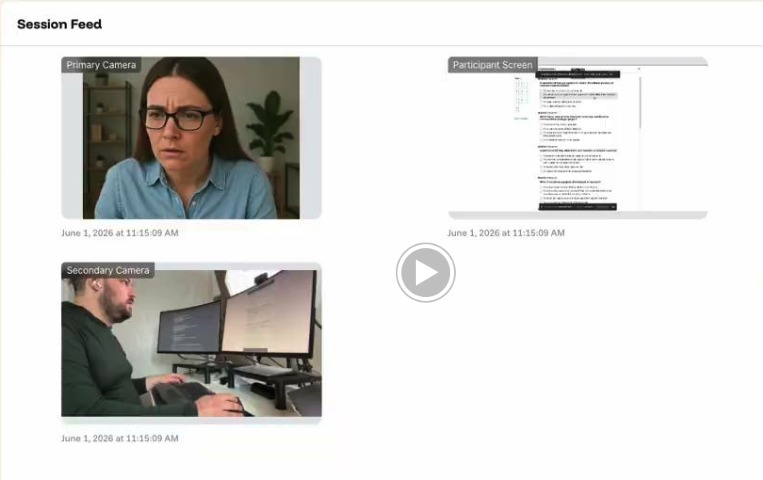
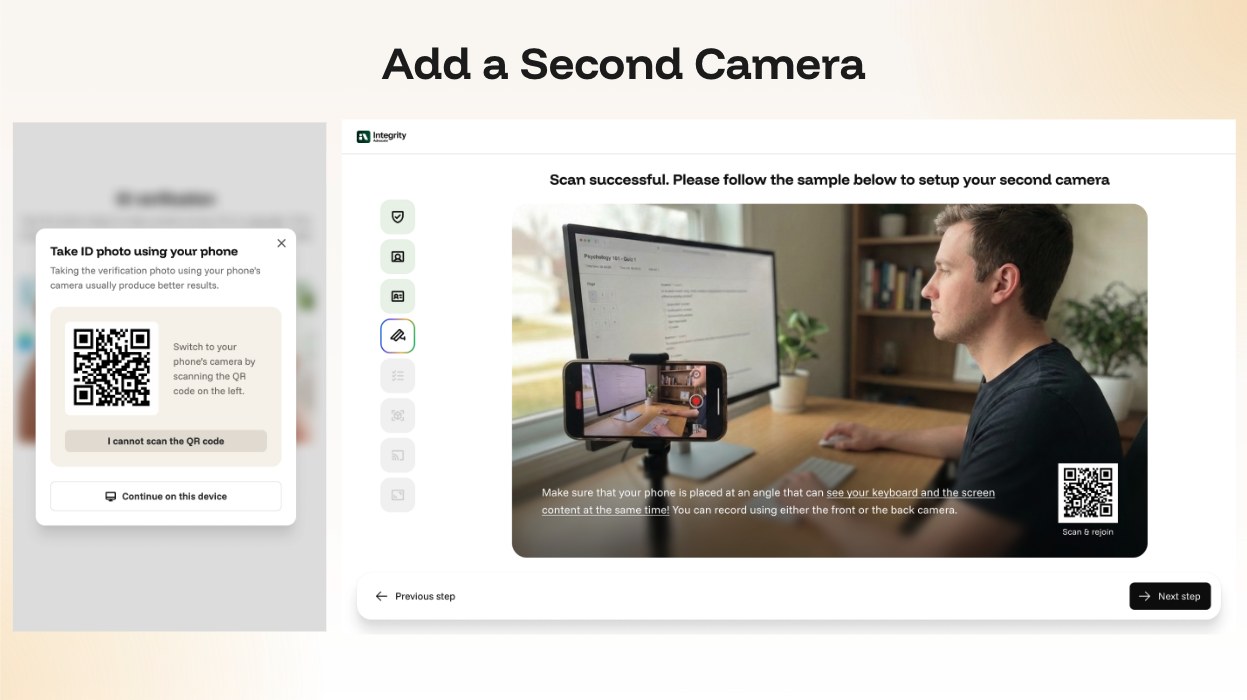
No app to install and no hardware to ship. The candidate scans a QR code with the phone already in their pocket, and the phone becomes the second camera for that session only. The setup screen shows them a worked example of where to place it, angled so the keyboard and the screen are both in view, and it works with either the front or the back camera.
The other question people ask is whether candidates can manage it. They can, because they are told what to expect before the day and walked through it in the product, step by step, with support available throughout. Nobody is ambushed by this at the start of an assessment.
Category 3
This is a human services market, not a software market. It is advertised openly, priced hourly, and sold under the terms "proxy interview support" and "job support."
| What is sold | Detail |
|---|---|
| Proxy attendance | A professional attends the technical or HR interview on the candidate's behalf. Advertised openly on B2B marketplaces at roughly ₹5,000 to ₹18,000 per hour depending on the job description. |
| Live interview support | Real-time assistance during coding rounds, system design and client-facing interviews, delivered by a human rather than software. |
| Post-hire job support | The same vendors sell ongoing support in which a third party performs the actual job after placement. The fraud frequently continues past the hire date. |
| Candidate marketing | Applying to roles on the candidate's behalf, plus resume and applicant tracking system optimization. |
| Supply side | Dozens of open listings recruiting proxy interviewers appear on mainstream job boards. The labor supply is not hidden. |
Category 4
Hidden instruction text placed in a resume, intended to be read by an AI screening system and not by a human. There is no commercial product. It spreads through free templates and social media instructional content, which is what makes it cheap and high volume.
Response
Capture-excluded overlay
An answer panel on the candidate's screen, excluded from the capture API, absent from the feed your interviewer sees.
Screen monitoring at the session level rather than reliance on the video platform's share feed, combined with detection of active AI applications, remote access software, and messaging clients running during the assessment. Human review of what is flagged before any conclusion is drawn.
Second device
A phone or tablet running the assistant, outside the reach of anything on the candidate's computer.
Environmental flagging for visible electronic devices, headphone and earbud use, other people present, and the candidate leaving camera view. For genuinely high-stakes roles, a second camera view. This is the case where proportionality matters most: reserve the heavier controls for the roles that warrant them.
Proxy participant
A different person sits the interview or the assessment.
Identity verification bound to the assessment itself rather than performed once at the top of the funnel, plus continuity checking across sessions so the person who sat the screen is the person who sat the final round. This is the single highest-value control in the entire register.
Synthetic identity in live video
Real-time face replacement and voice cloning.
Documented identity verification at the point of assessment with a retained, reviewable record, rather than a recruiter's real-time judgment. Human adjudication of anomalies. Do not rely on liveness gestures alone. Current models defeat the hand-wave test that federal guidance still recommends.
Unproctored take-home work
No assurance the named candidate did the work at all. If a take-home is unmonitored, assume a share of your submissions are model output. What you are grading is the tool, not the person, and it tells you nothing about what they can do unaided.
Participation monitoring with identity verification, which confirms the named person completed the work, without imposing full surveillance on an early-funnel candidate.
And if you want candidates using AI, which is a legitimate and increasingly common choice, this is what makes that decision measurable rather than blind. You see how long the work actually took and how it was produced, so a claim of expert AI use can be verified instead of taken on faith. Open-book only works as an assessment if you can see the book being used.
Resume prompt injection
Hidden instructions aimed at your screening model.
Outside proctoring scope, and worth naming as such. Raise it with your applicant tracking system vendor, ask what sanitization they perform on parsed text, and keep a human in the loop at the screening stage.
Three questions
Name the step. If the honest answer is that a recruiter looked at a face on a video call, you do not have a verification step, you have an impression. And if verification happens at offer stage, everything before it was unverified.
If an automated system can contribute to an adverse decision with no human reviewing it and no rationale recorded, that is a legal exposure independently of whether the flag was correct.
A candidate, a regulator or a plaintiff's counsel asks what evidence you have that the person you assessed is the person you hired. The answer should be a document, not a recollection.
If this is a problem you have
This register is deliberately vendor-neutral about the threat. What follows is not, because at some point you have to decide what to do about it. Both of these are useful even if you never buy anything from us.
A working session, not a pitch. Bring whoever owns talent, security or compliance.
If you would rather do your own reading before speaking to anyone, start here.
This register is updated quarterly. The Q4 2026 edition will re-verify every entry, add new entrants, and track which vendors have shut down, repositioned, or changed mechanism. If you would like it sent directly, or if you have encountered a tool or service not listed here, we would like to know.
integrityadvocate.com/interview-integrity
Compiled from vendor materials publicly available on August 18, 2026, together with US Department of Justice and Federal Bureau of Investigation publications, the July 31, 2026 eleven-nation joint alert, peer-reviewed research accepted to the USENIX Security Symposium 2026, and independent security research. Product claims are reproduced as marketing statements and are not verified capability assessments. Prices change frequently. This document is provided for defensive purposes and contains no instructions for use. Integrity Advocate has no affiliation with any product named in this register.